A website for accountants.
Make choosing your practice easier.
Your next client needs to know who you work with, what the fee covers and who will answer when they call. We design and build your practice website around those answers, then host it and help you keep it current.
From £15/mo, plus a one-off build pack from £29.
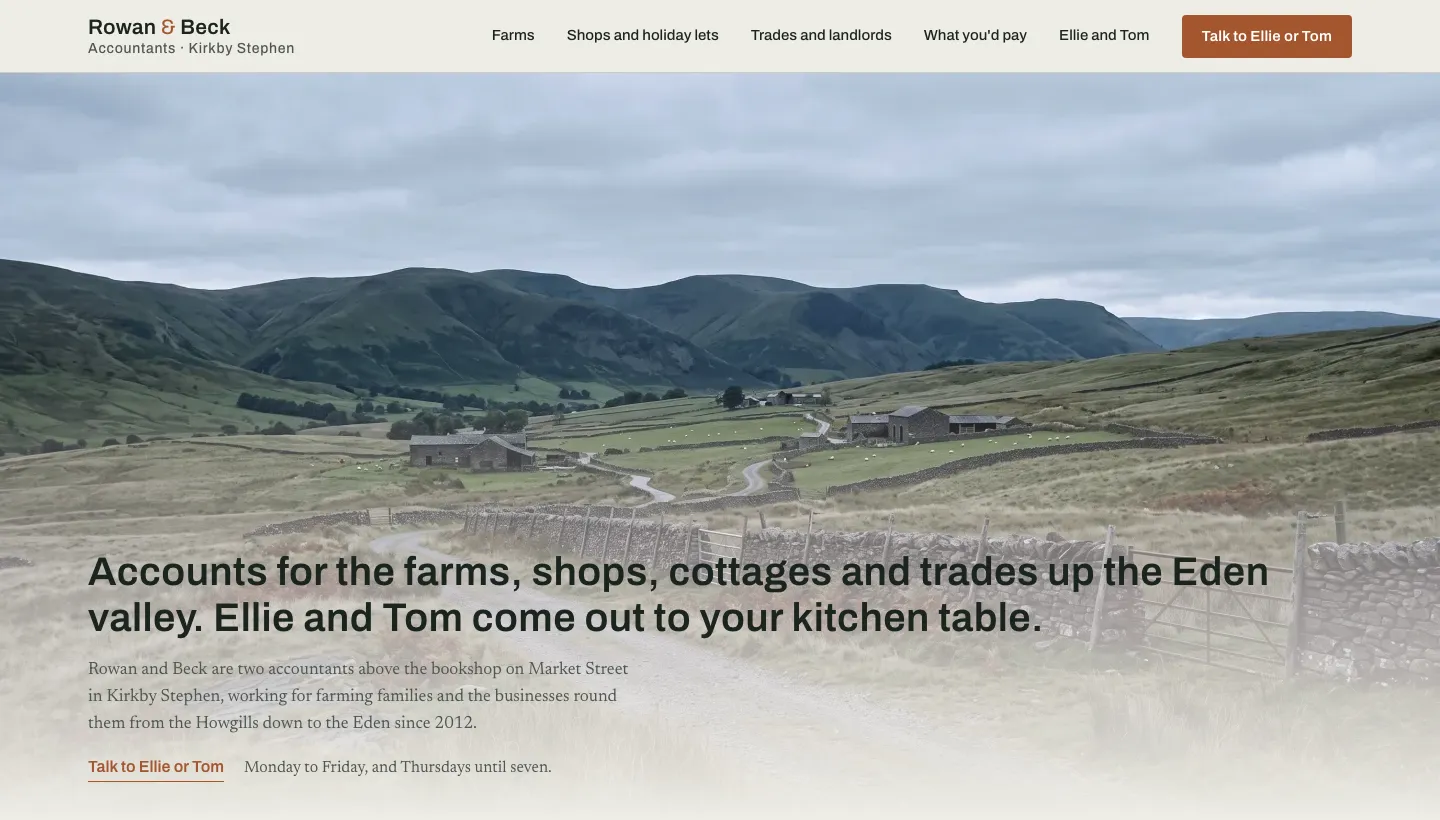
The opening names the clients, the place and the people who come out.
A live example of our work. Rowan & Beck is not a customer.What our research found
We read 1,220 UK accountancy websites.
6.8% showed any price.
Of the sites we read, 6.8% put a price up front. You need not publish a tariff for every possible client. Show a starting fee with its assumptions, or explain which facts you need to quote. Turnover, payroll, VAT status and the state of the records tell a visitor more than “tailored solutions”.
We read the front page of 1,220 UK accountancy practice websites in August 2026 and recorded what each one said and offered. These findings describe that sample and that page only; we did not read the rest of each site.
10.4% mentioned fixed fees.
A fixed fee still needs a scope. Say what is included, what counts as extra work and when you will agree an additional charge. “No hidden fees” leaves all of that for the first conversation.
28.2% named accounting software.
That proportion of the sites we read mentioned Xero, QuickBooks, Sage or FreeAgent. Name the packages you actually support. Say whether clients can keep their current software, who pays for it and who does the bookkeeping.
19.3% mentioned Making Tax Digital.
The sample records a mention, not whether the advice was complete. Your site should distinguish Income Tax from VAT, explain the support you offer and say who keeps records and submits updates. Give dated guidance an owner within the practice.
11.8 services were listed on average.
Bookkeeping, payroll and tax returns belong on the site. They do not all need equal space at the top. Let a landlord, sole trader or company director recognise their situation before asking them to navigate your service list.
37.7% named a professional body or used a chartered description.
Make the relevant credentials easy to check. Distinguish individual membership from the firm's status. Link to the appropriate register, and use the description and marks your professional body permits. AML supervision is a separate disclosure, not a quality award.
Before they become a client
A recommendation brings them here. Give them enough to go on.
A farmer checking a neighbour's recommendation, a director unhappy with their current firm and a sole trader opening an HMRC letter are looking for different things. A list of services asks each of them to work out which bits apply.
Start with the people you take on. Then explain the relationship: the work you do, the work they do, what they pay and the person they can reach. A sole practitioner can make that personal. A growing firm needs to make responsibility just as clear.
They want to know what the fee includes.
The monthly number is only useful with its boundaries. Does it cover bookkeeping, the software subscription, VAT returns, payroll and the director's own Self Assessment? Is getting overdue records up to date separate? Show the basis of the quote, including VAT treatment, beside the price.
They want to know who will deal with them.
Put names, photographs and accurate qualifications where prospective clients can find them. Explain who handles everyday questions and when a partner gets involved. If clients stay with a named person, describe how that works when that person is away.
They want to leave without a difficult handover.
Give switching a visible route. Explain consent, the professional enquiry to the previous accountant, requesting records and agreeing who handles work already in progress. Do not promise a handover date before you know the records and deadlines involved.
They need help before a deadline.
State whether you are taking on work for the approaching filing deadline and what you need to assess it. Keep the phone number visible. A booked conversation is an introduction, not confirmation that the practice has accepted the work.
Accountant website examples
Our example build
Rowan & Beck.
Made for the upper Eden valley.
We built this example around a practice in Kirkby Stephen working for farms, farm shops, holiday lets and local businesses. Rowan & Beck and its partners, Ellie Rowan and Tom Beck, are fictional. This is a demonstration of our work, not a customer story.

Clients choose their kind of business.
The photo cards lead to farms, shops and holiday lets, or trades and landlords. Each route explains the work in that setting. It is a useful structure for a practice with distinct specialisms, rather than a separate page for every accounting service.

The people are part of the service.
The partners appear at a farm gate, not behind an anonymous reception desk. The accompanying copy explains the named-partner arrangement and collection of records. For your own practice, use your actual people and describe how that relationship works.
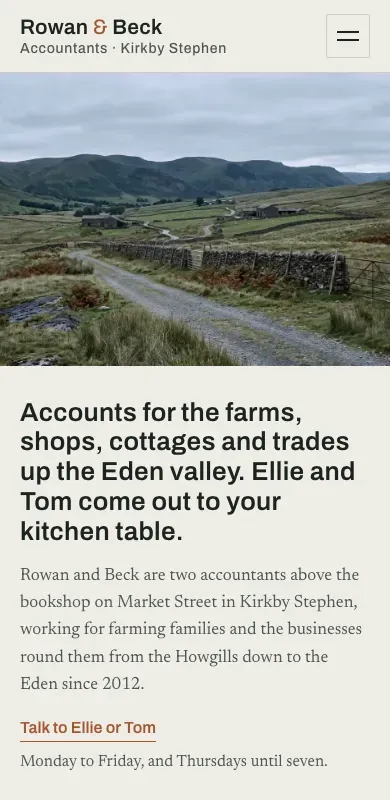
The phone keeps the same priorities.
The local setting, the people who come out and the route to a conversation remain visible.

The fee page explains the scope.
It groups the work by business type and says what affects the agreed fee. Each kind of client gets a starting fee, with what it covers and what changes it, and the exact figure is confirmed in writing before any work begins.
Explore the example build
The practice, people and situations in this build are fictional. Its imagery demonstrates the design; it is not evidence of customer relationships or results.
From the real-site scan
What these real practices put first.
Examples from the UK sites we read, described without naming the firms. Each gives a prospective client something specific to go on.
A fee you can compare.
Its packages identify the turnover band and the work included. A visitor can distinguish a sole-trader package with a tax return and bookkeeping software from company accounts with corporation tax, VAT and payroll. Switching also has a place in the main menu.
Take the combination: a bounded price and a visible way to move. A promise to save the client money is not needed to explain either.
A separate client entrance.
It opens with small businesses, freelancers and contractors, then puts a starting price on each service card. Existing clients have a login in the header, separate from the route for prospective clients.
That separation is useful to a practice manager. Someone looking for the payroll portal should not have to work through the new-business form.
A route for each situation.
Its fixed Self Assessment fee says that HMRC submission is included. Its “Who we help” menu follows situations such as being a landlord, self-employed or working in construction. Deadline tools sit alongside the offer.
Use the reader's situation to organise the site. Add a calculator or checker only if someone is responsible for keeping it accurate.
A reason for each sector.
Contractors get IR35, landlords get Section 24, healthcare gets NHS pensions and construction gets CIS. The practice also identifies its regulator in the header.
A sector page earns its place when the work changes. Name the issue, explain what you handle and give that visitor a relevant next step. Replacing an industry name in otherwise identical text adds little.
The site, page by page
Give each page a clear job.
Website design for accountants starts with the questions clients need answered. The right page count follows the practice; a sole practitioner does not need a page for every service. Combine related material where it remains easy to find.
Home: make the fit clear.
Say who you act for, where you work and whether you meet in person or remotely. Introduce the people, put fees within reach and keep switching visible. Existing clients need an obvious route to their portal. An enquiry button should explain the next step without implying you have agreed to act.
Fees: show the boundaries.
Group fees by the clients you actually take. Include the assumptions behind a starting price, billing frequency and VAT treatment. Distinguish ongoing work from catch-up work. If you quote individually, explain what information you need and how the quote is agreed.
People: identify the relationship.
Show the people clients will deal with, their roles and the qualifications they hold. Use photographs of your actual team. Explain whether the named partner does the work, supervises it or handles particular decisions. A photograph alone cannot explain how contact works.
Switching: describe the handover.
Explain what you need before agreeing to act, how you obtain consent to contact the previous accountant and what happens to the records. Identify responsibility for open returns and approaching deadlines. Use “professional enquiry”, the term used by ICAEW, rather than implying the outgoing firm grants permission to move.
Who you help: write for the work.
A farming partnership, a landlord and a contractor have different questions. Build dedicated pages where you have something specific to say. Describe the records, software and services involved. If a service is outside your practice's scope, say so before someone spends time on an enquiry.
Contact: make the next step practical.
Give phone and email routes, the hours someone answers and the address clients can actually visit. Explain access and appointment arrangements. Ask a new enquirer for the shape of the work and any urgent deadline. Keep tax documents, identity checks and account credentials out of the public enquiry form.
Keep the technical details under the practice's control.
Professional descriptions and tax guidance need a named approver in your practice.
For Making Tax Digital, distinguish Income Tax from VAT. Name supported software and explain who handles records and submissions. Link to current HMRC guidance rather than leaving an undated tax guide to age unnoticed.
Use “chartered accountants” for the firm only where the relevant body's rules allow it. State individual memberships accurately and identify the practice's AML supervisor separately. Review these descriptions when partners or the firm's status change.
A useful edit
Some things can come off the site.
Replace the generic claims.
“Traditional values with a modern approach” tells a client little about the service. Describe the actual arrangement: the named contact, the records you accept and the way you agree fees. Keep promises narrow enough for the practice to honour.
Retire the stale guidance.
Remove news banners after their deadline. Check software references when your service changes. Put responsibility for tax content with someone in the firm, and review it before publishing an update. A website service is not the practice's tax adviser.
Remove borrowed credibility.
Stock handshakes cannot introduce your team. Template badges cannot establish membership. Publish only genuine reviews you can attribute and have permission to use; do not expose a client's financial affairs in your reply.
Stop asking for records too early.
A prospect can describe their business and deadline without sending a tax return or passport. Link existing clients to the secure route you already use. Make it clear when someone is making an enquiry and when onboarding begins.
Choose the right way to build
A builder, an accountant website template, or done for you?
Your practice website,
built and looked after.
Tell ThemeSmith who you act for, how fees work and what clients value about dealing with you. We design and build from that brief. You can then request changes in plain English through Forge, our editing assistant. Your practice approves its own professional and tax wording.
Choose a monthly plan
Both include hosting, SSL and backups. Work with your assistant uses credits; these plans do not promise unlimited edits.
Add a one-off build pack
£29 1 page
£59 3 pages
£89 5 pages
The build pack is paired with the first month of your chosen plan. Each pack includes 30 days of Forge edits after the build. You can add pages at any time, priced per page, with the price shown before you pay.
Cancellation takes two clicks. Your domain stays yours. If you leave, we send a static snapshot of the site. Failed builds are not charged. There are no introductory rates.
Get startedBefore you start
Questions about websites for accountants in the UK.
What should a sole-practitioner accountant put on a website?
Make your client types, fees, qualifications and contact arrangements easy to find. Explain switching and give existing clients a separate route to their portal. Those jobs can share pages; the site need not be large to answer them well.
Can I show fees if every client gets an individual quote?
Yes. Publish a starting price only with its assumptions, or explain the information you use to calculate a quote. Make clear which work is separate. The aim is to explain your approach to charging before the visitor gets in touch.
Do we need a different website if we are a chartered firm?
You need accurate descriptions of the firm and its people. Check your body's rules for the firm's wording and any logos, then link the relevant register. Qualifications support the choice; clients still need to understand fees and how you work.
Should our site include Making Tax Digital advice?
Explain the support you actually offer, the relevant regime and the software you use. Assign someone to review dated advice. If you cannot maintain a detailed guide, link to current HMRC guidance and explain how clients can discuss their circumstances with you.
Can we keep our existing client portal?
Your public website can link to the portal you already use. Keep that route separate from new enquiries and check that it leads to the correct sign-in page. A website build should not be assumed to include replacing your practice software.
Will the website bring us more clients?
We cannot promise enquiries, rankings or revenue. We can build a site that clearly explains the practice and gives people a way to contact you. Your offer, reputation and the way you handle enquiries also affect what happens next.
What happens when the practice changes?
Request changes through Forge when fees, people or services change. Assistant work uses the credits in your plan; new pages are priced per page. Keep a named approver in the practice for professional descriptions and tax guidance.
Let people see the practice they were told about.
Start with who you work for, what your fee includes and who picks up the phone. We will help turn that into your website.
Chris Painter · Founder, ThemeSmith